nylon-core
Filament data model + tension decay
Documentation
From one-command Docker to a two-minute MCP setup, from the web console to the Python SDK — your first long-term memory in five minutes.
NylonME is a single-machine memory engine for AI agents. It models one memory as a weave of multiple strands — fact, affect, time, relation, confidence, frequency — with nodes connected by weighted edges into a mesh, not a hierarchy.
Retrieval is not top-k similarity but contextual resonance: starting from seed nodes, activation spreads along association strength, context match and live tension, bounded by a global budget. Unused memories settle along a tension-forgetting curve instead of piling up.
v0.4.1 ships the full production surface: REST/OpenAPI gateway with a built-in web console, Python SDK, LangChain / LlamaIndex integrations, tenant isolation with API-key auth, an audit event stream, TLS-encrypted transport, periodic snapshots, one-command Docker / Helm deploys, and a mobile SDK that runs inside Android / iOS app processes.
Three words are all you need — everything else is plumbing:
dev-yourname for personal cross-project memory; read / write / admin. Paste a key into the console's key box and the chip next to it answers "who am I" (powered by GET /v1/whoami). | You want to… | Do this |
|---|---|
| Separate projects' memories | One library per project (owner = project slug) |
| Share a project's memory with a teammate | Same space + tell them the library name |
| Grant / revoke access | Issue a write key on your space / keys revoke (hot reload, instant) |
| Hard-isolate a customer or team | Their own space + keys bound to it |
| Build a multi-user app on top | Your app holds one space key; one library per end-user; your app enforces user auth |
Small team sharing one engine? One space (default) + one library per project/person is the intended setup. Full version: docs/CONCEPTS.md in the repo.
Windows users don't need Docker — or a Rust toolchain. Grab the archive for your platform from GitHub Releases, unzip, and run:
| Archive | Platform |
|---|---|
nylonme-windows-x64.zip | Windows x86_64 |
nylonme-linux-x64.tar.gz | Linux x86_64 |
nylonme-macos-arm64.tar.gz | Apple Silicon |
# Windows: unzip, cd into the folder, one command to start
# (data lands in %USERPROFILE%\.nylonme\data automatically, v0.4.1+)
nylon-engine.exe serve 127.0.0.1:50051

# Open the console in your browser
start http://127.0.0.1:50052

# Same on Linux / macOS:
./nylon-engine serve 127.0.0.1:50051
Three steps: unzip → run → open the console. Since v0.4.1, data always lives in ~/.nylonme/data, so moving folders or upgrading never "loses" your memories. Each archive ships three binaries: nylon-engine (the engine), nylon_cli (write/recall from the shell), and smoke_client (self-check, prints SMOKE_OK when done).
No key needed at this step — a single machine runs in open mode by default, and the console, CLI, and MCP all connect directly. Keys only matter once you share the engine with a team and enable auth (see "Tenancy & auth" below); every client example marks where the key goes. For semantic recall (ollama embeddings), see "Run the engine".
Just want memory for Claude Code / Cursor / Codex? You can skip serve entirely — MCP stdio mode embeds the engine in-process, so one config snippet is all it takes. See "MCP setup".
No Rust toolchain needed: one command starts the engine plus ollama (which pulls the bge-m3 embedding model automatically). First start takes a few minutes (release build + model download):
git clone https://github.com/nylon-memory/NylonME.git
cd NylonME
docker compose up -d

# Skip the local build and pull prebuilt images instead
docker compose -f docker-compose.prebuilt.yml up -d
Then open the web console at http://localhost:50052 — gRPC is on :50051, and REST/OpenAPI shares the console's HTTP port. Data persists in the nylon-data named volume. Set NYLON_LLM_API_KEY (DeepSeek by default) before enabling the LLM weaving layer. For Kubernetes, use the bundled Helm chart (helm/ directory).
nylon-engine mcp speaks Model Context Protocol over stdio with the engine embedded in-process — no daemon, no port, data lands in ~/.nylonme/data. Works with every MCP client: Claude Code, Cursor, Codex, VS Code Copilot, and more. The embedded mode needs no key either — it's normal that the config has no key field:
{
  "mcpServers": {
    "nylonme": {
      "command": "/path/to/nylon-engine",
      "args": ["mcp"],
      "env": { "NYLON_OWNER": "my-project" }
    }
  }
}[mcp_servers.nylonme]
command = "/path/to/nylon-engine"
args = ["mcp"]
[mcp_servers.nylonme.env]
NYLON_OWNER = "my-project" Once connected, the agent gets four tools: memory_weave (persist facts), memory_resonate (recall related memories), memory_get (read by ID) and memory_feedback (report failed answers, driving targeted reflection).
When the engine runs as a shared daemon, its HTTP port also serves a Streamable HTTP MCP endpoint at http://<host>:50052/mcp. Clients that support remote MCP servers connect with nothing but a URL — no local binary, no bridge process:
{
  "mcpServers": {
    "nylonme": {
      "url": "http://192.168.1.5:50052/mcp",
      "headers": { "x-api-key": "nyl_..." }
    }
  }
}
The endpoint shares the in-process engine with gRPC/REST (same data), is stateless (no session affinity), requires a write-scope key when auth is enabled, and validates the key against the server tenant. For public deployments pin it with NYLON_MCP_ALLOWED_HOSTS.
To share one memory store across machines, use the remote bridge mode: set NYLON_SERVER=host:50051 (optionally NYLON_API_KEY) and stdio MCP calls forward to the remote engine instead of embedding one locally. The repo also ships a DSH plugin (plugins/dsh-nylonme-memory) that gives every DSH session long-term memory out of the box.
One golden rule: swap the binary, never move the data. Memories live in the data directory (graph.snp + wal.log + audit.jsonl), not in the executable. The on-disk format is forward-compatible (snapshot magic check + WAL CRC self-healing), so upgrades never need an export/import cycle.
Ninety percent of "it broke after upgrading" comes from three causes:
serve mode's default data dir ./nylon-data is relative to the launch directory, so a new folder starts an empty store (your old data is still sitting in the old folder). Fixed in code since v0.4.1: ./nylon-data is only used when it already exists; otherwise the engine falls back to ~/.nylonme/data and prints a startup warning instead of silently starting empty; nylon-engine.exe, or an old process still holding ports 50051/50052;NYLON_DATA_DIR, NYLON_EMBED_URL, ...) stranded in the old folder's launcher script. The right moves: stop the old process → confirm the data dir (the data= path in the startup log) → copy one backup → extract the new binaries into the same folder → restart and verify data= is unchanged. Pin NYLON_DATA_DIR to an absolute path and upgrades become pure drop-in binary swaps. Full five-step checklist and the symptom/cause table: docs/UPGRADE.md in the repo.
Grab a prebuilt binary from GitHub Releases, or build from source:
git clone https://github.com/nylon-memory/NylonME.git
cd NylonME/engine
cargo build --release -p nylon-engine --example nylon_cli# Minimal run (embeddings off, LLM off)
NYLON_DATA_DIR=./data ./nylon-engine serve 0.0.0.0:50051
# Recommended: ollama embeddings for semantic recall
ollama pull bge-m3
NYLON_DATA_DIR=./data \
NYLON_EMBED_URL=http://localhost:11434 \
NYLON_EMBED_MODEL=bge-m3 \
NYLON_EMBED_DIMS=1024 \
./nylon-engine serve 0.0.0.0:50051
# Optional: understanding layer (session-level fact weaving)
NYLON_LLM_URL=https://api.deepseek.com/v1/chat/completions \
NYLON_LLM_MODEL=deepseek-v4-flash \
NYLON_LLM_API_KEY=<your-key> \
NYLON_LLM_THINKING_OFF=1 \
./nylon-engine serve 0.0.0.0:50051 At startup the engine probes embedding-channel health: GET /v1/stats reports embedder_status as one of three states — ok / degraded (with an embed_failures counter and embedder_last_error) / disabled — so a dead embedding service no longer silently degrades recall to lexical-only.
Windows gotcha: with a system proxy enabled, the HTTP client may route even http://127.0.0.1:11434 through the proxy and ollama answers 502 Bad Gateway — use http://localhost:11434 instead (proxy bypass lists match localhost).
The engine binary ships a zero-install web console and REST API (default http://127.0.0.1:50052, disable with NYLON_HTTP_ADDR=off).
Seven views: Overview (engine stats, latest memories, activity stream, tension histogram), Memories (browse/filter with live tension), Graph (a dependency-free force-directed map of the memory web, colored by tension or owner), Resonate (debug queries: seeds, scores, adaptive depth — plus a one-click answer-quality feedback bar that drives idle reflection), Weave (single + session batch), Audit and Team (issue/revoke keys, per-member activity). The node drawer offers a Forget action (DELETE /v1/nodes/{id} writes a tombstone). Same engine, same write path as gRPC/MCP, with dark/light themes and an EN/中文 toggle built in.
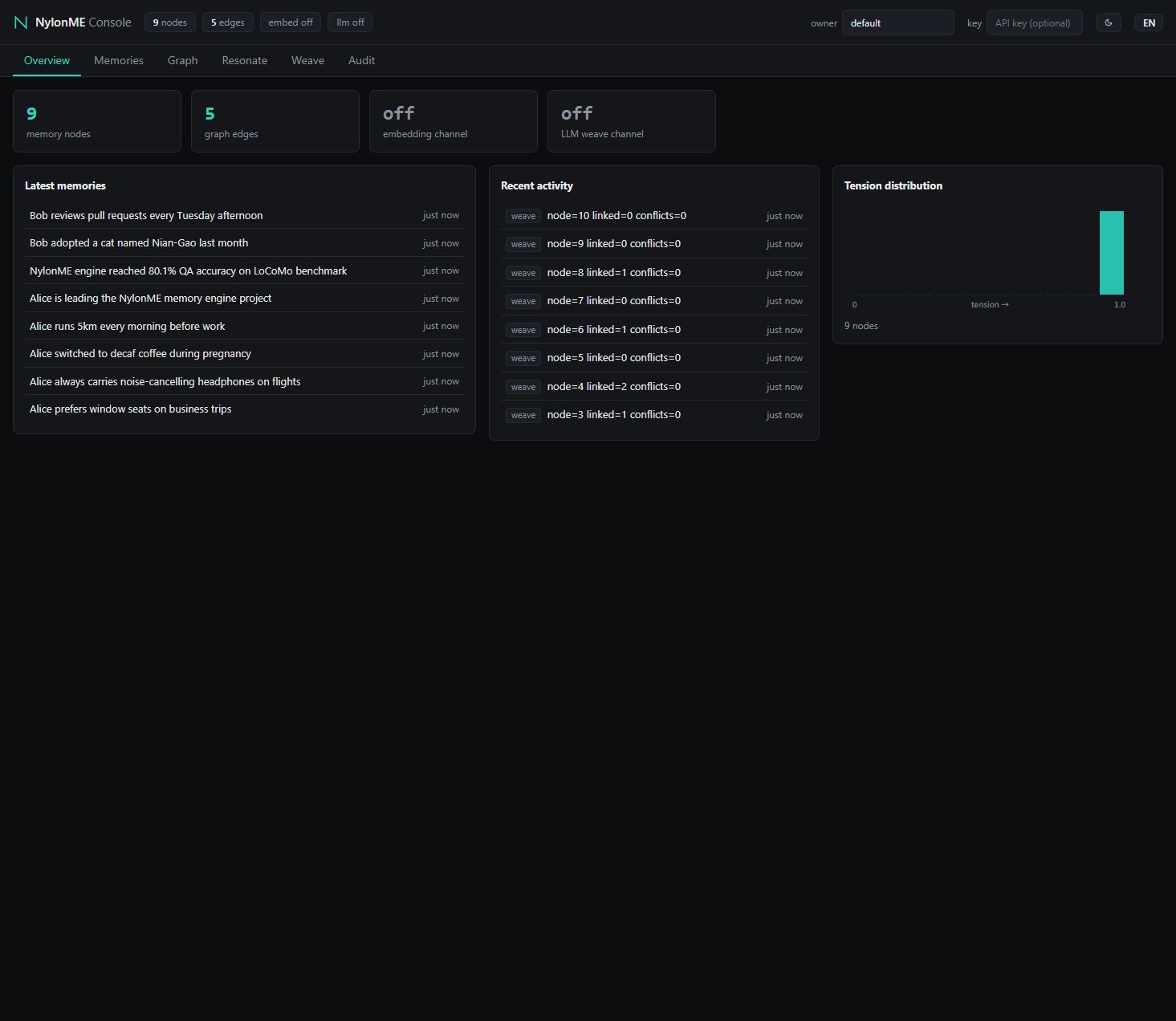
REST endpoints map one-to-one to the gRPC contract; the OpenAPI spec lives at docs/api/openapi.json in the repo.
nylon-sdk wraps the gRPC contract in sync + async clients:
pip install ./sdk/python # install from this repofrom nylon_sdk import NylonClient
with NylonClient("127.0.0.1:50051", owner="alice") as client:
client.weave("Alice prefers window seats on business trips")
for node in client.resonate("flight seat preference").activated:
print(node.filaments.fact)pip install "nylonme-integrations[langchain]" # or [llamaindex]from nylonme_integrations.langchain import NylonMeRetriever
retriever = NylonMeRetriever(target="127.0.0.1:50051", owner="alice")
docs = retriever.invoke("flight seat preference")nylon-mobile is the UniFFI binding of the in-process engine: no port, no gRPC, no network calls — memories stay in the app sandbox. It depends only on the four pure-Rust core crates (nylon-core / nylon-graph / nylon-storage / nylon-embed) and shares the same nylon-service implementation for weaving, resonance and retrieval as the server — identical behavior on both ends, including CJK query segmentation. Kotlin / Swift bindings are UniFFI-generated; releases ship .so / xcframework artifacts plus binding packages per tag.
| Method | What it does |
|---|---|
MobileEngine.new(config) | Open/create the local store; pass embed_model_path + embed_vocab_path together to enable on-device semantics |
weave(fact, task?, emotion?) | Weave a memory, returns node_id |
resonate(query, budget) | Contextual resonance recall |
get(local_id) | Read one memory by ID |
node_count() | Memory count |
checkpoint() | Flush to disk (call when the app goes to background) |
shutdown() | Compact + flush (call before releasing the instance; process kills are covered by the WAL) |
// Hook up once via ProcessLifecycleOwner in Application.onCreate
class MemoryEngineHolder(context: Context) : DefaultLifecycleObserver {
    private var engine: MobileEngine? = null

    @Synchronized
    fun engine(): MobileEngine = engine ?: MobileEngine(
        MobileConfig(
            dataDir = File(appContext.filesDir, "nylon/db").absolutePath,
            owner = "me",                // single user on-device; fixed is fine
            embedModelPath = model,      // pass null (with vocab) to skip semantics
            embedVocabPath = vocab,
        )
    ).also { engine = it }

    override fun onStop(owner: LifecycleOwner) { engine?.checkpoint() } // backgrounded
    fun destroy() { engine?.shutdown(); engine = null }                 // release
} WAL-first writes (group commit + fsync) mean a successful write is already durable; a killed process replays the WAL on next start. Automatic checkpoints fire every 32 writes or 300s (when dirty) by default — tune with autoCheckpointWrites / autoCheckpointSecs. Checkpoints only affect recovery speed, never correctness.
Lexical channel: with 20 mixed Chinese/English memories after a cross-process WAL recovery, all 8 Chinese queries hit top-1, ~55µs per resonate. On-device semantic channel (quantized bge-small-zh, 24MB, pure-Rust tract inference): 10/10 top-1, including a zero-lexical-overlap semantic probe; ~0.3–1.2s per resonate including query embedding (Snapdragon 778G-class CPU). Quantized models must have value_info stripped first (scripts/prepare_onnx_model.py in the repo). Deployment and iOS details: engine/crates/nylon-mobile/ README and INTEGRATION.md.
The engine supports tenant isolation and API-key auth with three scopes: read < write < admin:
NYLON_API_KEYS_FILE (or inline NYLON_API_KEYS) to enable auth: HTTP requests carry an x-api-key header or Authorization: Bearer, gRPC calls carry x-api-key metadata; * tenant.# First start generates an admin key and prints it once
# Hand out keys to teammates afterwards (hot-reloaded, no restart)
nylon-engine keys add --tenant prod --scope write --name alice # -> nyl_... (shown once)
nylon-engine keys list # masked overview, with member aliases
nylon-engine keys revoke nyl_aaa # by full key or unique prefix The --name alias attaches a member identity to a key: with NYLON_AUDIT on, every audit event carries actor=alice, and GET /v1/audit?actor=alice shows per-person activity. Admins can also manage keys over REST — GET /v1/keys (masked list), POST /v1/keys (full key returned exactly once), DELETE /v1/keys/{prefix} — and the console's Team view wraps it with issue/revoke buttons. The MCP bridge and CLI forward NYLON_API_KEY automatically.
Plaintext by default (acceptable when the engine only listens on loopback). Set two env vars and both the gRPC port and the HTTP/UI gateway switch to TLS — no nginx/Caddy in front required. Setting only one is a startup error: no half-encrypted state.
# The two variables must be set together; both the gRPC port and
# the HTTP/UI gateway switch to TLS at once
export NYLON_TLS_CERT=/etc/nylonme/tls/server.pem   # PEM certificate chain
export NYLON_TLS_KEY=/etc/nylonme/tls/server.key    # PEM private key
nylon-engine serve 0.0.0.0:50051
# -> gRPC listening on 0.0.0.0:50051 (grpcs, ...)
# -> HTTP/UI listening on https://0.0.0.0:50052 (TLS)

# Quick self-signed certificate for a LAN:
openssl req -x509 -newkey rsa:2048 -nodes -days 825 \
  -keyout server.key -out server.pem \
  -subj "/CN=192.168.1.5" -addext "subjectAltName=IP:192.168.1.5,DNS:nylonme.lan"

# Clients opt in with an https:// URL; trust the CA for self-signed:
export NYLON_SERVER="https://192.168.1.5:50051"
export NYLON_TLS_CA=/path/to/server.pem
The web console works as-is at https://host:50052 (accept the certificate warning once for self-signed certs). The DSH plugin takes the same https:// base URL; if Node's fetch does not pick up a self-signed CA, install the CA into the OS trust store or set NODE_EXTRA_CA_CERTS. Plaintext clients hitting a TLS port fail at handshake (by design), and vice versa. At-rest encryption is on the roadmap (L2.6); the honest security model lives in SECURITY.md in the repo.
RocksDB supports periodic snapshots with WAL truncation (NYLON_CHECKPOINT_SECS, default 600s), or trigger one manually with POST /v1/checkpoint for hot backups. Full procedure: docs/BACKUP_RESTORE.md in the repo.
--owner isolates memory namespaces; --tenant defaults to codex.
export NYLON_SERVER=http://127.0.0.1:50051
export NYLON_API_KEY=nyl_...   # only when the engine has auth enabled; not needed in single-machine open mode

# Weave your first memory
./nylon_cli weave --owner alice --task travel \
  --fact "Alice prefers window seats on business trips"
# -> NODE_ID=0

# Resonate related memories
./nylon_cli resonate --owner alice \
  --query "flight seat preference" --budget 5
# -> ACTIVATED=1
# -> 0  0.812  Alice prefers window seats on business trips
A good fact is a self-contained sentence with names, numbers and paths. Never weave secrets or passwords into memory.
| Variable | Default | Effect |
|---|---|---|
NYLON_MAX_SEEDS | 20 | Seed set cap (lexical + vector channels) |
NYLON_RERANK_VEC | 0 | Weight of query-vector cosine mixed into resonance ranking |
NYLON_TENSION_FLOOR | 0 | Tension floor during ranking (does not mutate node state) |
NYLON_SEED_QUOTA | 0 | Reserved top slots for direct seed hits in output |
NYLON_LLM_MAX_TOKENS | 4096 | LLM output budget; raise when session-split JSON gets truncated |
NYLON_ECHO_DEMOTE | off | (0,1) coefficient demoting short query-echo nodes below explanatory content |
NYLON_SESSION_DEDUP | off | weave_session reuses nodes for identical (tenant, owner, text) events; retry/replay safe |
NYLON_DERIVED_EDGES | off | Abstract-layer to leaf edges (measured net-negative; keep off) |
NYLON_WORLD_BRIDGES / _ASYNC | off | Commonsense world-knowledge bridging (sync / async reflection) |
NYLON_PERSONA_REFLECT | off | Persona node extraction during async reflection |
NYLON_REFLECT_IDLE_SECS | — | Idle interval for async reflection |
NYLON_HTTP_ADDR | 127.0.0.1:50052 | HTTP / UI listen address (off to disable) |
NYLON_DATA_DIR | see note | RocksDB data directory: ./nylon-data if it exists, else ~/.nylonme/data (since v0.4.1) |
NYLON_CHECKPOINT_SECS | 600 | Periodic snapshot interval in seconds (0 to disable) |
NYLON_API_KEYS_FILE / NYLON_API_KEYS | — | API key table (file path or inline JSON) |
NYLON_TLS_CERT / NYLON_TLS_KEY | — | PEM cert chain / private key; set together to switch both gRPC and HTTP ports to TLS |
NYLON_TLS_CA | — | Client-side CA trust for self-signed certs (MCP bridge / Python SDK) |
NYLON_MCP_ALLOWED_HOSTS | — | Pin the Host allowlist for the /mcp endpoint on public deployments |
NYLON_AUDIT | off | Audit event stream switch |
NYLON_SERVER | — | MCP remote-bridge target (host:50051) |
NYLON_API_KEY | — | Client key for a remote engine (bridge / CLI) |
NYLON_OWNER / NYLON_TENANT | default | Default MCP owner / tenant |
NylonME/
├── proto/            # nylon/v1 gRPC contract
├── engine/           # Rust workspace (9 crates)
├── sdk/python/       # Python SDK (nylon-sdk)
├── integrations/     # LangChain / LlamaIndex adapters
├── plugins/          # Agent-platform plugins (DSH, ...)
├── docs/             # Guides & API specs
└── helm/ # Kubernetes deployFilament data model + tension decay
CSR main graph + delta buffer + resonance walk
HNSW vector index
Embedding client (ollama / OpenAI-compatible)
Understanding layer: fact weaving, conflict detection
RocksDB persistence (WAL + snapshots, crash recovery)
Shared core for server / mobile
Engine entrypoint + gRPC services (tonic)
UniFFI bindings: in-process engine for Android / iOS